
Opprette veilederkonto
Som lærer har du muligheten til å opprette veilederkontoer på TOPP-N. Hvis veilederen du ønsker å tilordne til en student i en av gruppene dine ikke har en konto, følger du disse trinnene:
Naviger til 'Grupper'-fanen i side menyen.
Velg den ønskede gruppen og klikk på 'Legg til hoved-/sekundærveileder'-knappen ved siden av studentens navn på 'Studenter'-fanen.
På popup-vinduet velger du mellom å invitere veilederen via e-post eller opprette kontoen selv.
Hvis du velger invitasjonsalternativet, vil mottakeren etter at de har opprettet kontoen, være kvalifisert for tilordning til en student.
Hvis du velger å opprette veilederens konto selv, vennligst del påloggingsinformasjonen med veilederen.
Denne prosessen sikrer en smidig opplevelse for veiledere som blir en del av gruppene dine på TOPP-N.
As a teacher, you have the ability to create supervisor accounts on TOPP-N. If the supervisor you wish to assign to a student in one of your groups doesn't have an account, follow these steps:
Navigate to the 'Groups' tab in the side navigation menu.
Select the desired group and click the 'Add Primary/Secondary Supervisor' button next to the student's name on the 'Students' tab.
On the pop-up, choose between inviting the supervisor via email or creating the account yourself.
If you select the invitation option, once the invitee creates their account, they will be eligible for assignment to a student.
If you choose to create the supervisor's account yourself, please share the login credentials with the supervisor.
This process ensures a smooth onboarding experience for supervisors in your groups.
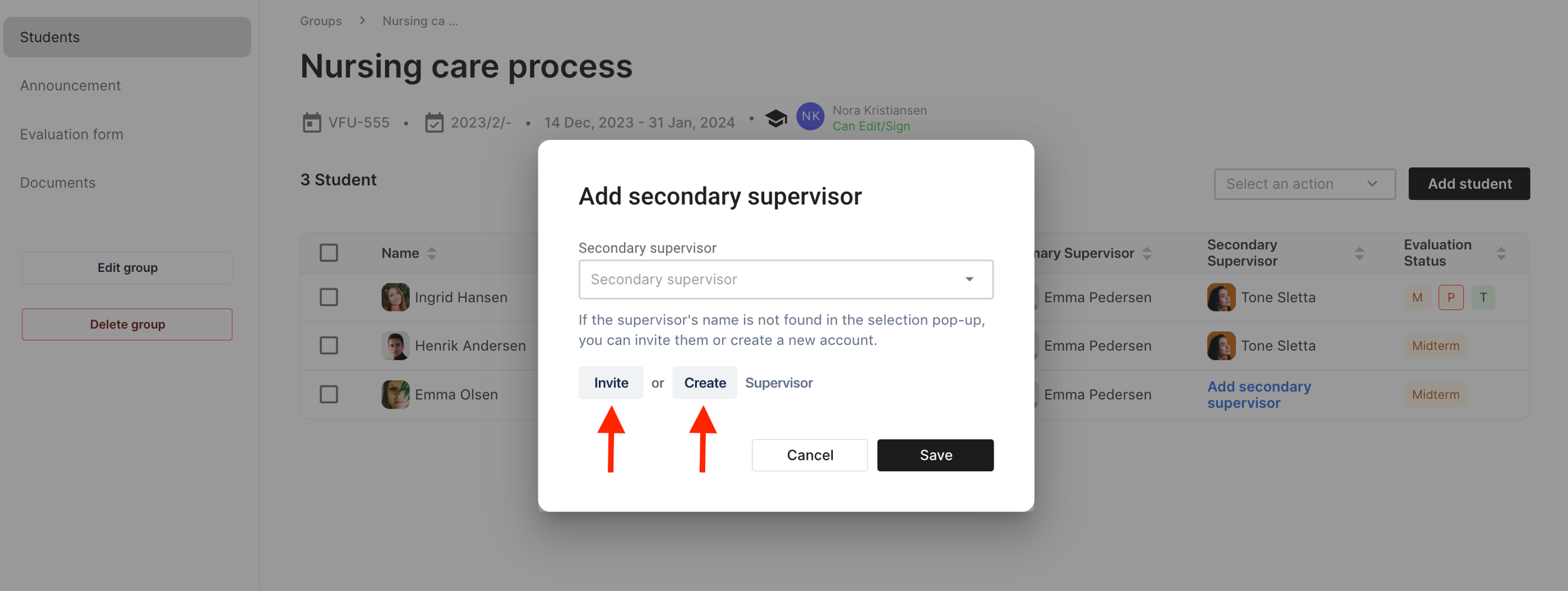
To gain a deeper understanding of how to invite/create a supervisor account to TOPP-N, please proceed with the tutorial provided below.
Last updated